
:fill(white)/https://www.toppstiles.co.uk/static/cms/media/766957_-_living_room-spc.jpg)
:fill(white)/https://www.toppstiles.co.uk/static/cms/media/766927_2_-_living_room-real_wood.jpg)
:fill(white)/https://www.toppstiles.co.uk/static/cms/media/Knowledge-Base%20Laminate.webp)
:fill(white)/https://www.toppstiles.co.uk/static/cms/media/Jackoboard-Price-Drop-600x600-v3.jpg)
:fill(white)/https://www.toppstiles.co.uk/static/cms/media/new-in-eb-waterproof-tanking.jpg)
:fill(white)/https://www.toppstiles.co.uk/static/cms/media/Excel-Bond-Logo-square.webp)
:fill(white)/https://www.toppstiles.co.uk/static/cms/media/BAL-1-1.webp)
:fill(white)/https://www.toppstiles.co.uk/static/cms/media/RUBI-Logo-white-background.webp)
:fill(white)/https://www.toppstiles.co.uk/static/cms/media/DEX-1-1.webp)
:fill(white)/https://www.toppstiles.co.uk/static/cms/media/warmup-meganav-v2.jpg)
:fill(white)/https://www.toppstiles.co.uk/static/cms/media/rise-meganav-v2.jpg)
:fill(white)/https://www.toppstiles.co.uk/static/cms/media/LVT1.jpg)
:fill(white)/https://www.toppstiles.co.uk/static/cms/media/Everscape-Enis-Black.webp)
:fill(white)/https://www.toppstiles.co.uk/static/cms/media/wall-panels-product-blocks.jpg)
:fill(white)/https://www.toppstiles.co.uk/static/cms/media/shower-panels-landing-page-2.png)
:fill(white)/https://www.toppstiles.co.uk/static/cms/media/Aluminium-splashback.jpg)
:fill(white)/https://www.toppstiles.co.uk/static/cms/media/bahco-1-1.jpg)
:fill(white)/https://www.toppstiles.co.uk/static/cms/media/dakota-1-1.jpg)
:fill(white)/https://www.toppstiles.co.uk/static/cms/media/Dewalt-Logo-1.webp)
:fill(white)/https://www.toppstiles.co.uk/static/cms/media/Dural-1-1.webp)
:fill(white)/https://www.toppstiles.co.uk/static/cms/media/fila-new-logo.jpg)
:fill(white)/https://www.toppstiles.co.uk/static/cms/media/Jackon.png)
:fill(white)/https://www.toppstiles.co.uk/static/cms/media/Hardiebacker-Header-Mobile-V3.webp)
:fill(white)/https://www.toppstiles.co.uk/static/cms/media/Kerakoll%20(1)-2.png)
:fill(white)/https://www.toppstiles.co.uk/static/cms/media/Marcrist.webp)
:fill(white)/https://www.toppstiles.co.uk/static/cms/media/Marshalltown-1-1.webp)
:fill(white)/https://www.toppstiles.co.uk/static/cms/media/multipanel-logo.png)
:fill(white)/https://www.toppstiles.co.uk/static/cms/media/palace-logo.jpg)
:fill(white)/https://www.toppstiles.co.uk/static/cms/media/raimondi_500x500.webp)
:fill(white)/https://www.toppstiles.co.uk/static/cms/media/rise-logo.jpg)
:fill(white)/https://www.toppstiles.co.uk/static/cms/media/Schluter.png)
:fill(white)/https://www.toppstiles.co.uk/static/cms/media/Sigma-1-1.webp)
:fill(white)/https://www.toppstiles.co.uk/static/cms/media/Stabila-Mobile-v2.webp)
:fill(white)/https://www.toppstiles.co.uk/static/cms/media/ultragrime-logo.jpg)
:fill(white)/https://www.toppstiles.co.uk/static/cms/media/UltraTileFix-1-1.webp)
:fill(white)/https://www.toppstiles.co.uk/static/cms/media/Warmup-1-1.webp)
:fill(white)/https://www.toppstiles.co.uk/static/cms/media/Wedi-1-1.webp)
:fill(white)/https://www.toppstiles.co.uk/static/cms/media/tiled-it-new-meganav.jpg)
:fill(white)/https://www.toppstiles.co.uk/static/cms/media/3x2-(6).png)
:fill(white)/https://www.toppstiles.co.uk/static/cms/media/About-us-customer-service.jpg)
:fill(white)/https://www.toppstiles.co.uk/static/cms/media/tile-calculator-new-meganav.jpg)
:fill(white)/https://www.toppstiles.co.uk/static/cms/media/Directors-Header.jpg)
:fill(white)/https://www.toppstiles.co.uk/static/cms/media/Rubi-Cutters-Trade-Square-600x600px.jpeg)
:fill(white)/https://www.toppstiles.co.uk/static/cms/media/EB-Matting-Price-Drop-600x600-v2.jpg)
:fill(white)/https://www.toppstiles.co.uk/static/cms/media/Autumn-Promo-Trade-Square-600x600px.jpeg)
:fill(white)/https://www.toppstiles.co.uk/static/cms/media/DEX-Bundle-Trade-Square-600x600px.jpeg)
:fill(white)/https://www.toppstiles.co.uk/static/cms/media/APP-LANDING%20PAGE%20BANNER%20-%20DESKTOP%20-%2010%20off.jpg)
Don’t miss out on exclusive pricing and faster ordering. Download the Topps Trade App today to unlock your full trade benefits, manage your TradePay credit on the go, and start earning Rewards+ points instantly.


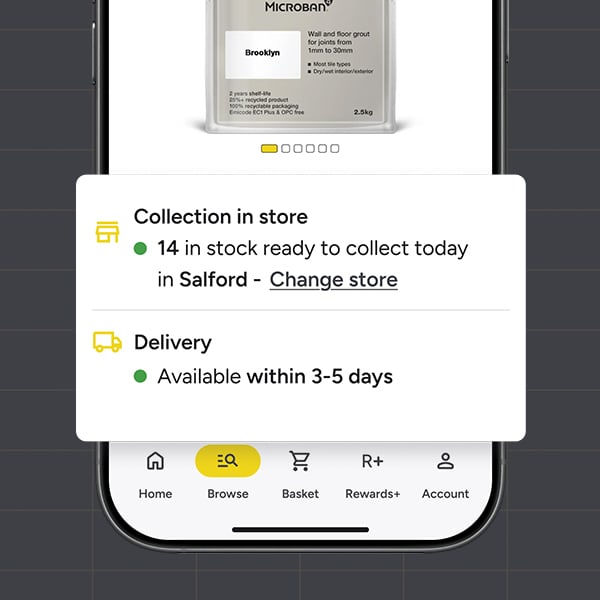
Check Stock Before You Travel
✓
SHOP WITH CONFIDENCE, KNOWING IT'S ON THE SHELF.
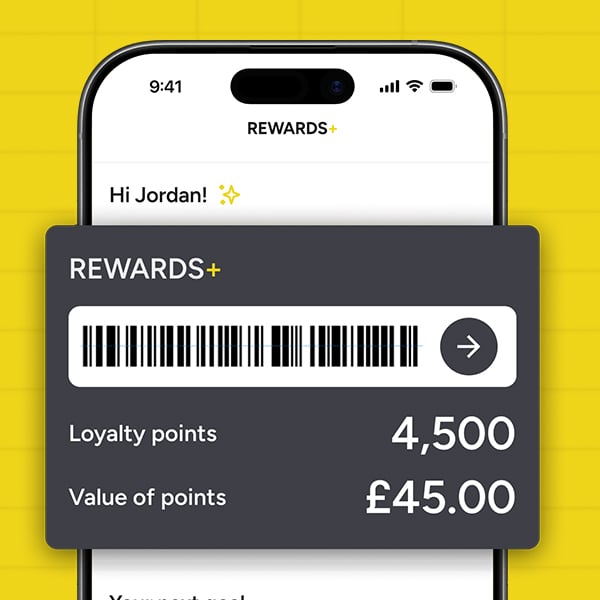
Join Rewards+
✓
EARN POINTS & ACCESS EXCLUSIVE REWARDS & DISCOUNTS.
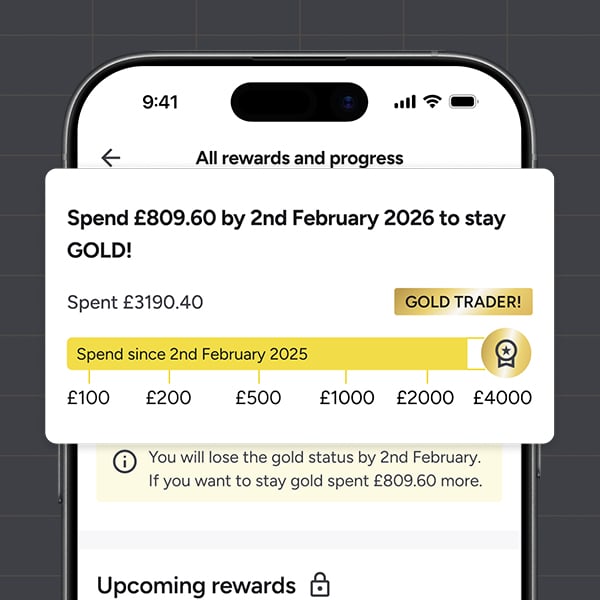
Aim For Gold
✓
UNLOCK EXCLUSIVE GOLD PERKS & REWARDS WHEN YOU SPEND OVER £4,000 A YEAR.
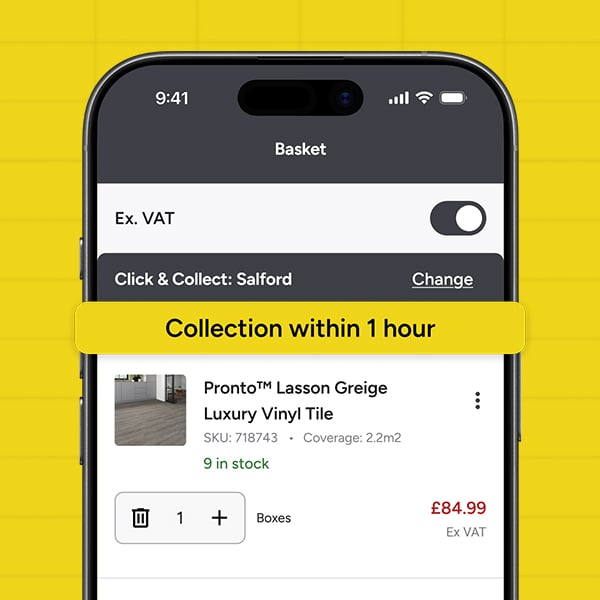
Click & Collect Easily In-Store
✓
ORDER IN THE APP & COLLECT THE SAME DAY.
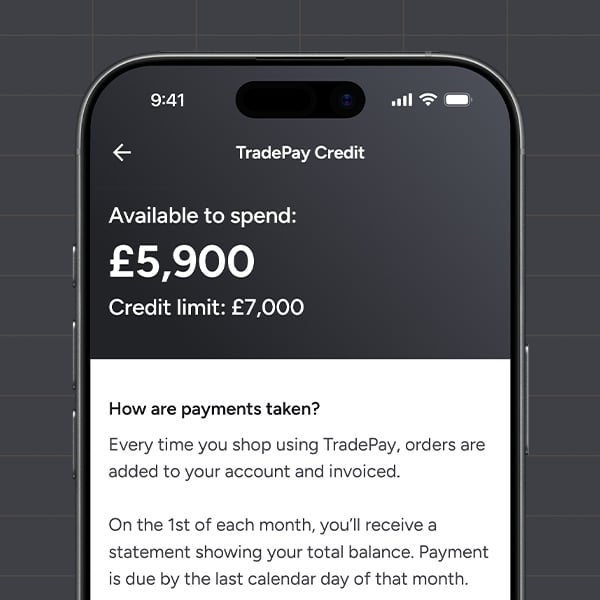
30 Days Interest Free TradePay
✓
APPLY IN THE APP & TRACK YOUR SPENDING.
*subject to approval
*subject to approval
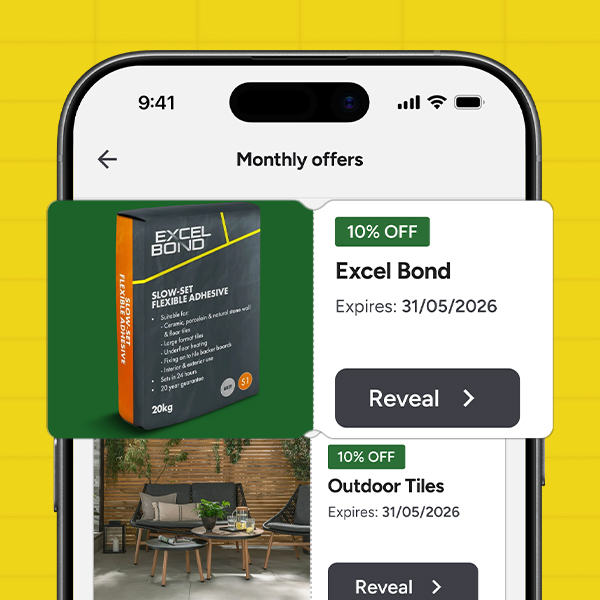
Reveal App-Only Deals
✓
PRICES YOU WON'T FIND ONLINE OR IN-STORE.
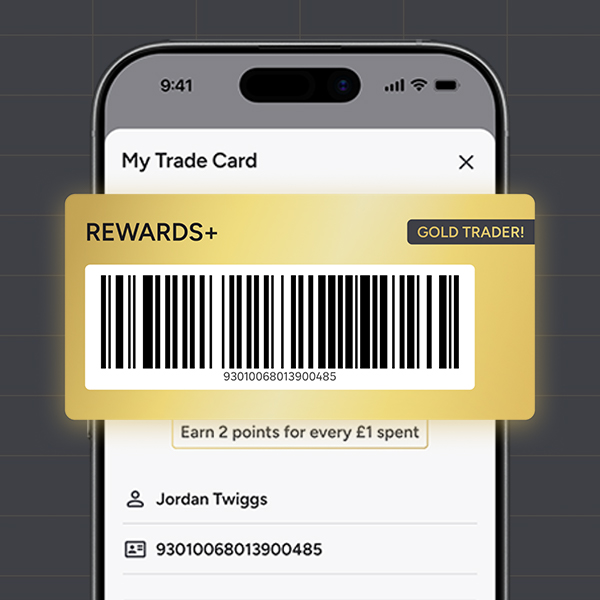
Scan & Go In-Store
✓
YOUR DIGITAL TRADE ACCOUNT CARD. JUST SCAN AT THE TILL TO EARN POINTS.
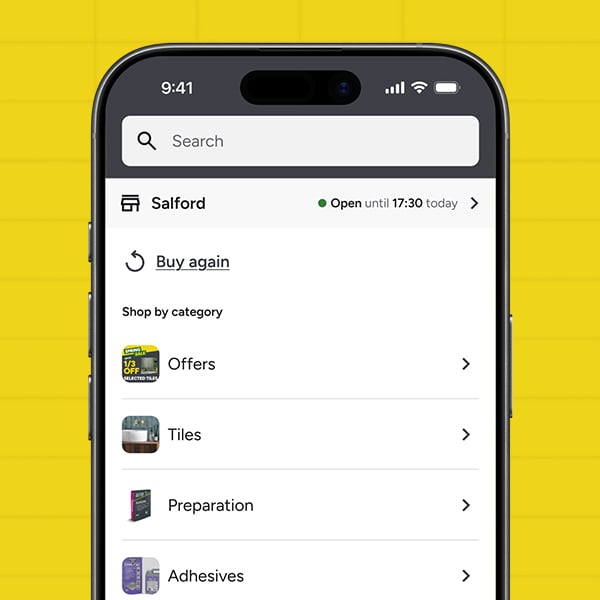
Discover Our Full Product Range
✓
SHOP FOR TILES, FLOORING, TOOLS & SO MUCH MORE!
FAQ's
GETTING STARTED
+ What is the Topps Trade App?
The Topps Trade App is the dedicated mobile app for Topps Tiles trade customers. Browse our full product range across 300+ branches, access your trade pricing, place orders for delivery or Click and Collect, manage your TradePay credit, and earn Rewards+ points, all in one place. Available free on iOS and Android.
+ Is the Topps Trade App free to download?
Yes. The app is free to download on iOS and Android. Search "Topps Tiles Trade" in the App Store or Google Play to get started.
+ How do I register for the Topps Trade App?
Download the app from the App Store or Google Play and tap "Register" on the welcome screen. You'll need to be a sole trader or limited company to create an account. If you run into any issues during registration, the app will point you to your nearest branch where a colleague can get you set up. Once registered, you'll have full access to trade pricing, your order history, and Rewards+.
+ Can I use the app without an account?
Yes. You can browse our full product range and check stock as a guest, and you'll still be able to see trade pricing. To add items to your basket and check out, use your job list, earn Rewards+ points, or apply for TradePay, you'll need a trade account.
+ I created my account in-store, can I use the app?
Yes. Head to the login screen and look for the "Created your account in-store?" section at the bottom of the screen. Tap "Set your password" and follow the steps to create one. Once that's done, you'll be logged straight into the app and ready to go.
+ How do I reset my password?
From the login screen, tap the forgotten password option and follow the steps to reset via email. If you're already logged in, head to your account page and select Change Password from the My Account section.
PRODUCTS AND STOCK
+ How can I check if a product is in stock?
The app has live stock feeds connected to every Topps Tiles store. You can check availability on category pages and on each individual product page. Stock is based on your selected store, so if a product is not available for same-day collection, you'll be shown the next available collection date. You can also change your selected store at any time to check stock at other branches. For delivery, you'll be shown the earliest date you can get the product to you.
ORDERS AND DELIVERY
+ Can I order for Click and Collect and delivery in the same order?
Yes. You can mix collection and delivery in a single order. When browsing, add products using either "Click and Collect" or "Add for Delivery." In your basket you'll see a clear split between the two. You can switch individual products between collection and delivery at any time by tapping the three dots next to the product.
+ Can I reorder previous purchases through the app?
Yes, though the app currently shows orders placed through the app or website only. In-store orders are not available to view just yet, but this is coming in a future update. For receipts or details on in-store purchases, your nearest branch will be happy to help. For app and web orders, go to your account page, tap My Online Orders, and select any previous order to add the same products back to your basket.
+ How do I track my order?
You can check the status of your orders from My Online Orders in the account page under the My account section on the app.
ACCOUNT
+ What is my trade card and how do I use it in-store?
Your digital trade card is a barcode stored in the app that links directly to your trade account. You can access it from the homepage card widget, the Rewards+ page, or your account page. Show it to a colleague at any of our 300+ branches and they can scan it to pull up your account on the till straight away.
+ Will my trade contracted pricing show on the app?
Not yet. Contracted pricing is not currently displayed in the app, but this is planned for a future update.
+ How do I toggle between ex-VAT and inc-VAT pricing?
You can switch between ex-VAT and inc-VAT in two places: via your account page under About App then App Settings, or using the Filter and Sort option on any category page.
+ Why might I have trouble logging in or registering?
If you are using a VPN, this can sometimes interfere with the app's security checks and stop login or registration from completing. Try turning off your VPN and connecting via your standard mobile data or Wi-Fi. If you're still having trouble, get in touch with our support team who can help via phone or email.
+ How do I contact support if something isn't working?
Go to the account page in the app and tap the support section, where you'll find a Contact Us option with phone and email details. The support section is there whether you're logged in or browsing as a guest.
PAYMENTS
+ What payment methods can I use?
The following payment methods are accepted in the app:
- Card payments
- Apple Pay
- Google Pay
- PayPal (delivery orders only)
- TradePay (available to customers who have applied and been approved for credit)
+ How do I make a TradePay payment?
At checkout, select TradePay as your payment method. TradePay is only available to customers with approved credit. If you haven't applied yet or your application is still being reviewed, this option will not be available at checkout.
TRADEPAY
+ What is TradePay and how does it work?
TradePay is a credit facility that lets you buy now and pay later on qualifying orders, helping you manage cashflow across jobs. It's an add-on to your trade account and you can apply for it directly within the app. Once your credit is approved, you'll be able to use it at checkout, and you can view your balance and credit limit at any time from the account page by selecting TradePay.
REWARDS+
+ What is Rewards+ and how do I earn points?
Rewards+ is the Topps Tiles loyalty programme for trade customers. You earn points on qualifying purchases made through the app or in-store when your trade card is scanned. Spend £4,000 and you'll reach Gold trader status, unlocking rewards along the way. You'll also get access to exclusive app-only monthly offers that refresh every month for all trade customers. Your points balance is visible in the app at any time.
+ How do I redeem my Rewards+ points?
Points can currently be redeemed in-store only. Bring your trade card to any branch and a colleague can apply them against your purchase. In-app redemption is on the way in a future update.
+ How do I redeem my in-app rewards and monthly offers?
Go to your Rewards+ page and tap "Reveal" on the reward or offer you want to use. You'll be taken to the voucher detail page. Tap "Reveal Coupon" to view your discount code and barcode, which can be used in-store or in the app. Once you reveal a coupon, you have 3 hours to use it. After this time the voucher will expire and cannot be restored, so only reveal it when you're ready to use it.